
 |
How to find out your IP address |
 |
 |
 |
|
 |
Category: Web SurfingThe first method is simple:
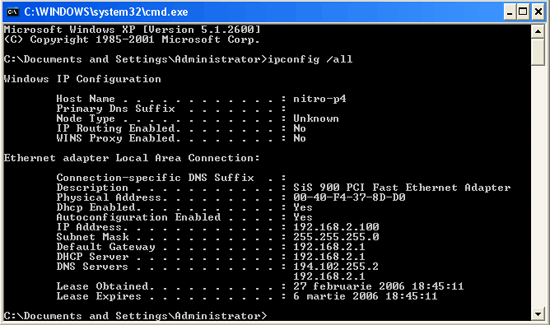
A list like the one below should be displayed.
You can see that your IP address is displayed along with other useful information. The only downside to this method is that if you aren’t connected directly to the internet but through a local area network (by a router, for example), the IP displayed will be your local IP, and not your Internet one. The second method is even simpler then the first (yes, it is possible). All you have to do is open your internet browser and go to this page on our site: http://www.bubble.ro/?page=showmyip and you’ll see the IP as it’s detected by the website along with a bag full of other useful information.
Posted by: Nitro on February 27, 2006 at 19:30.
|
 |
 |
 |
» Comments
Direct Macro
Direct Macro, established in 2018, has rapidly transformed into a respected online hub for computer enhancements. Our platform acts as a holistic repository, housing an array of top-tier computer peripherals and supplementary tools, all thoughtfully selected to enhance your technological odyssey. Within our inventory, a rich tapestry of offerings unfurls, encompassing not only cables and connectors but also indispensable hardware components, each meticulously tailored to meet your exacting specifications. At Direct Macro, our resolute commitment revolves around prioritizing the satisfaction of our esteemed patrons, relentlessly endeavoring to deliver a seamless, adept, and exceptional shopping experience with every interaction.
Posted by Direct Macro on December 27, 2023 at 01:34 PM.
Direct Macro
https://directmacro.com/hp-f0v69a-b1h-inkjet-printer.html
Posted by Direct Macro on December 27, 2023 at 01:35 PM.
Direct Macro, established in 2018, has rapidly transformed into a respected online hub for computer enhancements. Our platform acts as a holistic repository, housing an array of top-tier computer peripherals and supplementary tools, all thoughtfully selected to enhance your technological odyssey. Within our inventory, a rich tapestry of offerings unfurls, encompassing not only cables and connectors but also indispensable hardware components, each meticulously tailored to meet your exacting specifications. At Direct Macro, our resolute commitment revolves around prioritizing the satisfaction of our esteemed patrons, relentlessly endeavoring to deliver a seamless, adept, and exceptional shopping experience with every interaction.
Posted by Direct Macro on December 27, 2023 at 01:34 PM.
Direct Macro
https://directmacro.com/hp-f0v69a-b1h-inkjet-printer.html
Posted by Direct Macro on December 27, 2023 at 01:35 PM.
Random Article
Search
Feeds

All Categories
Articles
Aetolia - The Midnight Age
How to create the histogram of an image using PHP
How to convert an image to grayscale using PHP
How to check if an image is grayscale in PHP
Interchanging 2 variables without the use of a third
Error launching browser window:no XBL binding for browser
Convert the AOL user session collection to a MySQL database
Introduction to Matlab
Creating a customized session handling system in PHP (part II)
Creating a customized session handling system in PHP (part I)
Firefox crashing with Yahoo! Messenger
ADL Search for oDC
Video codecs explained
Browsershots
How to use Auto-Away Message with oDC
Create complete Windows XP disk with SP2 and all updates
Data Execution Prevention error message in Windows XP
Google Mars
Logarithmic scale graphs in Excel
Urban Dictionary (or wtf does l33t mean?)
Learn more about BIOS
Backup your Firefox and Thunderbird settings
Syndicate your Yahoo 360 profile
What is Google PageRank?
'Cannot Open the File: Mk:@MSITStore' Error Message
Get your Gmail with Mozilla Thunderbird
E-Books links
Change the size of your Explorer thumbnails
Remove previews from Windows Explorer
How can I turn off system beeps?
How do I disable Internet Explorer?
What are proxies or how do I protect my anonymity?
How to set aliases triggers or macros in MushClient
What is RSS?
Palm Zire 31 fast review
oDC Installation and Basic Configuration
How I built a 2x80W amplifier (using power modules)
Leech/HotLink Protection
How to block referrer detection?
How to find out your IP address
Getting started with Mushclient
What is spyware and how do I protect my PC from it?
Stumble Upon - random surfing around the web
Automatic file backup for Windows users
How can I read foreign language sites?
Protect your web surfing privacy!
What is BitTorrent?
No more ads! Adblock for Firefox
Why use Firefox instead of Internet Explorer?
How do I create my own Yahoo ID?
How to create the histogram of an image using PHP
How to convert an image to grayscale using PHP
How to check if an image is grayscale in PHP
Interchanging 2 variables without the use of a third
Error launching browser window:no XBL binding for browser
Convert the AOL user session collection to a MySQL database
Introduction to Matlab
Creating a customized session handling system in PHP (part II)
Creating a customized session handling system in PHP (part I)
Firefox crashing with Yahoo! Messenger
ADL Search for oDC
Video codecs explained
Browsershots
How to use Auto-Away Message with oDC
Create complete Windows XP disk with SP2 and all updates
Data Execution Prevention error message in Windows XP
Google Mars
Logarithmic scale graphs in Excel
Urban Dictionary (or wtf does l33t mean?)
Learn more about BIOS
Backup your Firefox and Thunderbird settings
Syndicate your Yahoo 360 profile
What is Google PageRank?
'Cannot Open the File: Mk:@MSITStore' Error Message
Get your Gmail with Mozilla Thunderbird
E-Books links
Change the size of your Explorer thumbnails
Remove previews from Windows Explorer
How can I turn off system beeps?
How do I disable Internet Explorer?
What are proxies or how do I protect my anonymity?
How to set aliases triggers or macros in MushClient
What is RSS?
Palm Zire 31 fast review
oDC Installation and Basic Configuration
How I built a 2x80W amplifier (using power modules)
Leech/HotLink Protection
How to block referrer detection?
How to find out your IP address
Getting started with Mushclient
What is spyware and how do I protect my PC from it?
Stumble Upon - random surfing around the web
Automatic file backup for Windows users
How can I read foreign language sites?
Protect your web surfing privacy!
What is BitTorrent?
No more ads! Adblock for Firefox
Why use Firefox instead of Internet Explorer?
How do I create my own Yahoo ID?